Voice to mind map
A mind map that grows while you talk
Say your ideas out loud and each one is added to the map as you say it, joined to the idea it belongs to. No typing, no dragging boxes, no waiting for the recording to finish.
Five minutes of the live pen free every day. Works in Chrome, Edge and Safari; any browser can type.
Live, not after the recording
Most voice-to-mind-map tools make the map after you stop talking. This one draws it while you talk, so you can see where your thinking is going and steer it: notice a branch with nothing on it and talk about that next.
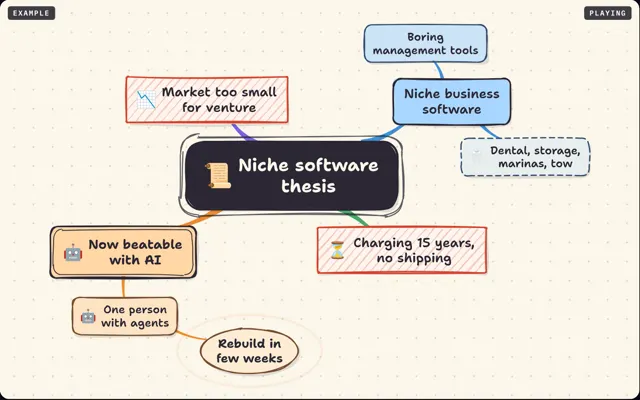 MapEach point you make becomes a node, joined to the idea it belongs to, as you say it.About a second a picture on the live pen
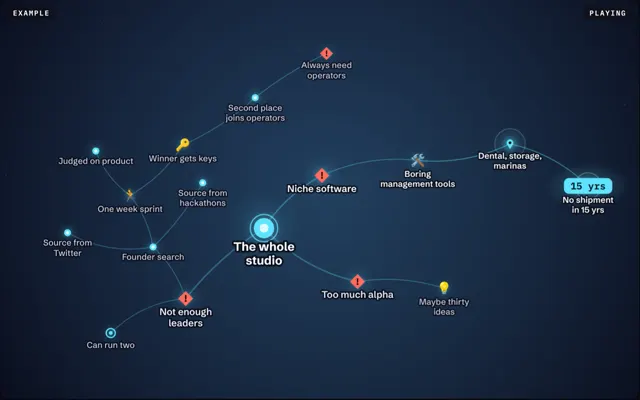 BrainEvery idea from a long conversation on one page.About a second a picture on the live pen
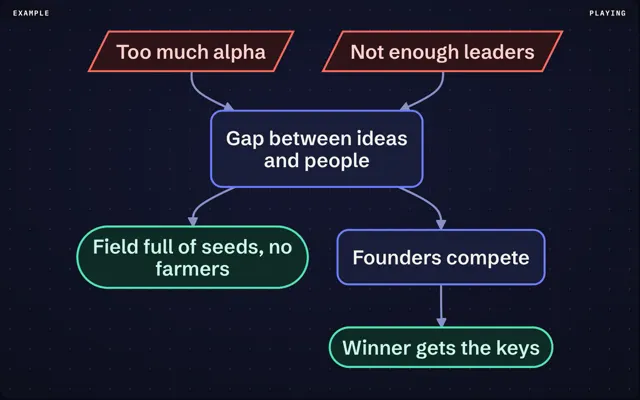 DiagramExplain how something works, what happens after what, or who talks to whom, and it is drawn as a flowchart, a timeline or a sequence diagram while you talk.About a second a picture on the live pen
Map or Brain?
| Map | Brain | |
|---|---|---|
| Best for | One topic: an essay, a plan, a decision | A whole conversation: a call, a lecture, an afternoon |
| Pages | Starts a new map when you change subject | One map, never turns the page |
| Layout | Ideas joined to the idea they belong to | Every idea joined to where it belongs, the whole talk on one page |
To explain a process rather than a set of ideas, use Diagram: it draws flowcharts and timelines.
How long you wait
What it cannot do yet
- It does not export to mind-map apps (Xmind, MindNode, OPML). You can download the story as a video, your voice, a transcript or subtitles, and share a link.
- It hears one microphone. In a room, put the computer near whoever is talking.
Questions
How do I make a mind map in real time by voice?
Open Tellavibe, choose the Map theme, press the red button and talk. Each idea is added to the map within a second or two of saying it. Choose Brain if the conversation will be long.
Is it free?
Five minutes of the live pen are free every day, with no sign-up. Plans start at $9 a month.
Can I use it in a meeting?
Yes: run it on the computer that hears the meeting and share your screen, or leave Brain running on a second screen.
Can I type instead?
Yes, in any browser. Typed lines are drawn the same way.
Read next
- Live visual notes of a talk, a class or a meetingLive visual notes drawn by AI as people talk: a growing idea map, a poster of the facts, flowcharts of the process. For talks, classes and meetings.
- A thought visualizer that draws what you think, while you say itA thought visualizer that draws what you think while you say it out loud: sketches, mind maps and animated scenes, a second behind your voice. Free.
- Speech to image, in real time: talk and watch it drawnSpeech to image in real time: talk and the picture is drawn as you speak, about a second behind your voice, in 13 styles. Free in your browser, no sign-up.